
Already using Elasticsearch or OpenSearch and been meaning to try Vespa?
Run migrate2vespa on an Elasticsearch or OpenSearch mapping to generate a starter Vespa application for the constructs it supports. Sample documents and queries can help it identify field shapes and usage.
At Searchplex, we help enterprise teams migrate search applications from Lucene-based systems such as Solr, Elasticsearch, and OpenSearch to Vespa. In that work, source fields and queries tend to fall into a few groups: some convert directly; some need adapting to Vespa’s way of doing things; some need closer review and experimentation; and some need a Vespa-native strategy because there is no direct equivalent.
We shared these patterns and more in our talk at the Vespa AI London meetup, Patterns from Shipped Migrations. They also motivated us to build migrate2vespa, which currently accepts Elasticsearch and OpenSearch inputs. It handles straightforward and intermediate conversions, while flagging the cases that need more engineering attention.
How it works
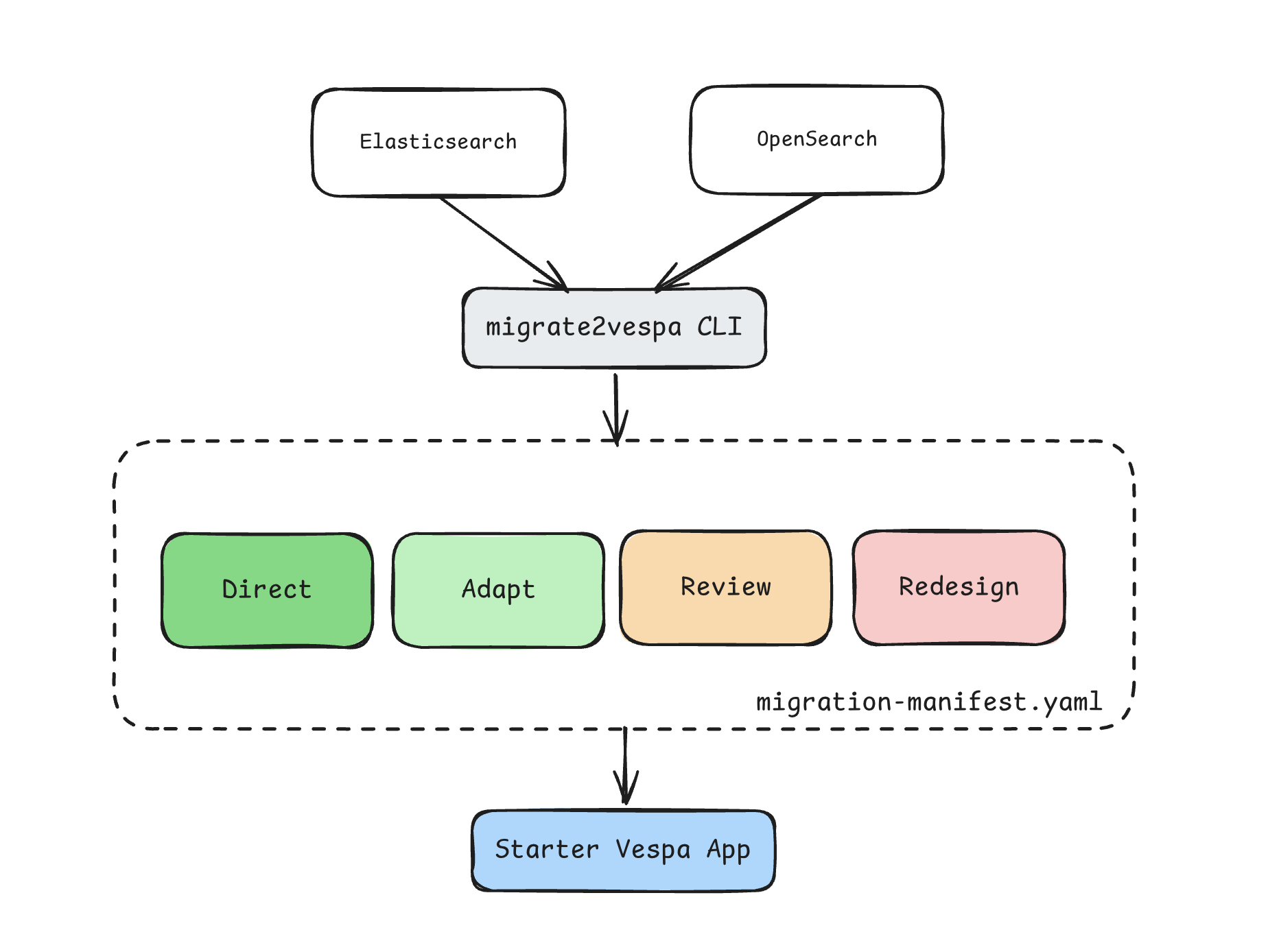
Sample documents and Elasticsearch or OpenSearch queries are optional inputs, but they give the tool useful evidence: documents show the shapes fields take, and queries show how the application uses them. The tool works in two steps:
- Assess:
migrate2vesparecords its findings and field plans in a migration manifest. - Generate: It uses the resolved plans in that manifest to generate the parts of a Vespa application it can handle safely.
Because source assessment is separate from Vespa generation, the project can add other source engines later.
A worked example
The quickstart fixture models a small product-catalogue search application. Each document represents a product, with fields for its SKU, title, description, brand, category, price, stock status, tags, and an eight-dimensional embedding. The fixture also includes five example queries, covering exact SKU lookup, catalogue search, custom text analysis, business boosting, and vector search. We’ll use its mapping, sample documents, and queries to see what migrate2vespa plans.
This excerpt covers three useful cases: title has a keyword multi-field, sample documents contain arrays for tags, and description uses a custom analyzer:
{
  "title": {
    "type": "text",
    "fields": {
      "raw": {"type": "keyword"}
    }
  },
  "tags": {"type": "keyword"},
  "description": {
    "type": "text",
    "analyzer": "catalog_english"
  }
}
The fixture also supplies settings, 50 sample documents, and five queries. One document contains:
{"tags": ["shoes", "black", "trail"]}To run it:
git clone https://github.com/searchplexai/migrate2vespa.git
cd migrate2vespa
python3 -m pip install -e .
migrate2vespa fixtures/quickstart
The tool writes a migration manifest and a starter Vespa application.
For the quickstart, the generated package looks roughly like this:
out/vespa-app/
├── services.xml
├── schemas/
│   └── quickstart.sd
└── feed/
    └── documents.jsonl
What the tool does and doesn’t generate
- Sample documents: when provided, each becomes a Vespa
putoperation with values for generated fields and its source document ID; without them,documents.jsonlis empty. The quickstart supplies 50 samples.migrate2vespareads local files and does not fetch or export documents from a running cluster. - Queries: the CLI records query findings as evidence in the migration manifest. It does not convert Elasticsearch or OpenSearch queries to YQL.
services.xml defines the Vespa application services, and the schema contains the generated field definitions. The feed contains only the sample documents you supplied, not a full index export.
Deploy, feed, and query it
If you don’t have a Vespa environment yet, follow Vespa’s local or cloud getting-started guide first.
Once you have a Vespa target configured, deploy the generated application and feed the sample documents:
vespa deploy --wait 600 fixtures/quickstart/out/vespa-app
vespa feed fixtures/quickstart/out/vespa-app/feed/documents.jsonl
You can then verify that the documents are available with a simple query:
vespa query 'yql=select * from sources * where true' 'hits=3'That completes the first loop:
Elasticsearch/OpenSearch files
            ↓
      migrate2vespa
            ↓
   starter Vespa application
            ↓
       deploy + feed
            ↓
          query
The migration manifest shows how the tool reached those decisions.
What the field plan tells you
An Elasticsearch mapping can tell you that tags is a keyword, but it does not say whether documents contain one value or an array. Elasticsearch has no separate array field type, so the sample documents provide that evidence. A text field may also depend on an analyzer whose behavior needs its own Vespa design.
migrate2vespa can therefore use more than the mapping. Sample documents provide evidence about the values actually present, while queries show which fields the application searches, filters, sorts, or otherwise uses.
The migration manifest records the source declaration, observed evidence, required field behavior, proposed Vespa field, and a decision. Each field or query finding gets one of four decisions: DIRECT, ADAPT, REVIEW, or REDESIGN.
Some fields in the quickstart map directly and receive DIRECT.
title.raw: adapt the multi-field
For title.raw, the decision is ADAPT.
The Elasticsearch keyword multi-field becomes a separate Vespa field named title__raw, populated from the source title value. The manifest records both the renamed field and its source path.
tags: the documents change the field plan
For tags, the source mapping only says:
"tags": {"type": "keyword"}But the sample documents show values such as:
["shoes", "black", "trail"]This is a small example of a difference in the two systems’ data-modeling philosophies. Elasticsearch lets a field contain one value or an array of values without a separate array type in the mapping. Vespa asks you to declare the field’s type in the schema. Here, the sample documents show that tags is multivalued, and a representative query shows how the application uses it:
{"query": {"bool": {"filter": [{"term": {"tags": "shoes"}}]}}}The tool uses that query as evidence of exact filtering; it does not translate the query. Given the observed values and their use, it can propose Vespa’s explicit array<string> type and avoid treating tags as a scalar.
The resulting field plan is:
| Plan detail | tags |
|---|---|
| Source | keyword |
| Evidence | Array values observed in sample documents |
| Required behavior | Multivalued string field |
| Decision | ADAPT |
| Target | array<string> |
The generated Vespa field is:
field tags type array<string> {
    indexing: summary | attribute
    match {
        word
        cased
    }
    rank: filter
}
The generated field keeps tags as separate values, matches case-sensitively, and assigns filtering behavior through rank: filter.
summary keeps the values available in returned document summaries. attribute stores them as a Vespa attribute, which makes the field suitable for operations such as filtering, sorting, and grouping. rank: filter tells Vespa to treat matching this field as filtering rather than as a relevance signal.
Where the tool stops
Not every source field should become generated Vespa configuration.
description uses the custom Elasticsearch analyzer catalog_english.
Generating an ordinary indexed string would not establish equivalent text behavior. The tool therefore marks the field REVIEW and leaves it out of the starter application rather than guessing.
One of the supplied queries also uses function_score. That query receives a REDESIGN decision because its scoring policy needs a Vespa ranking design.
The generator still includes other fields whose plans are resolved.
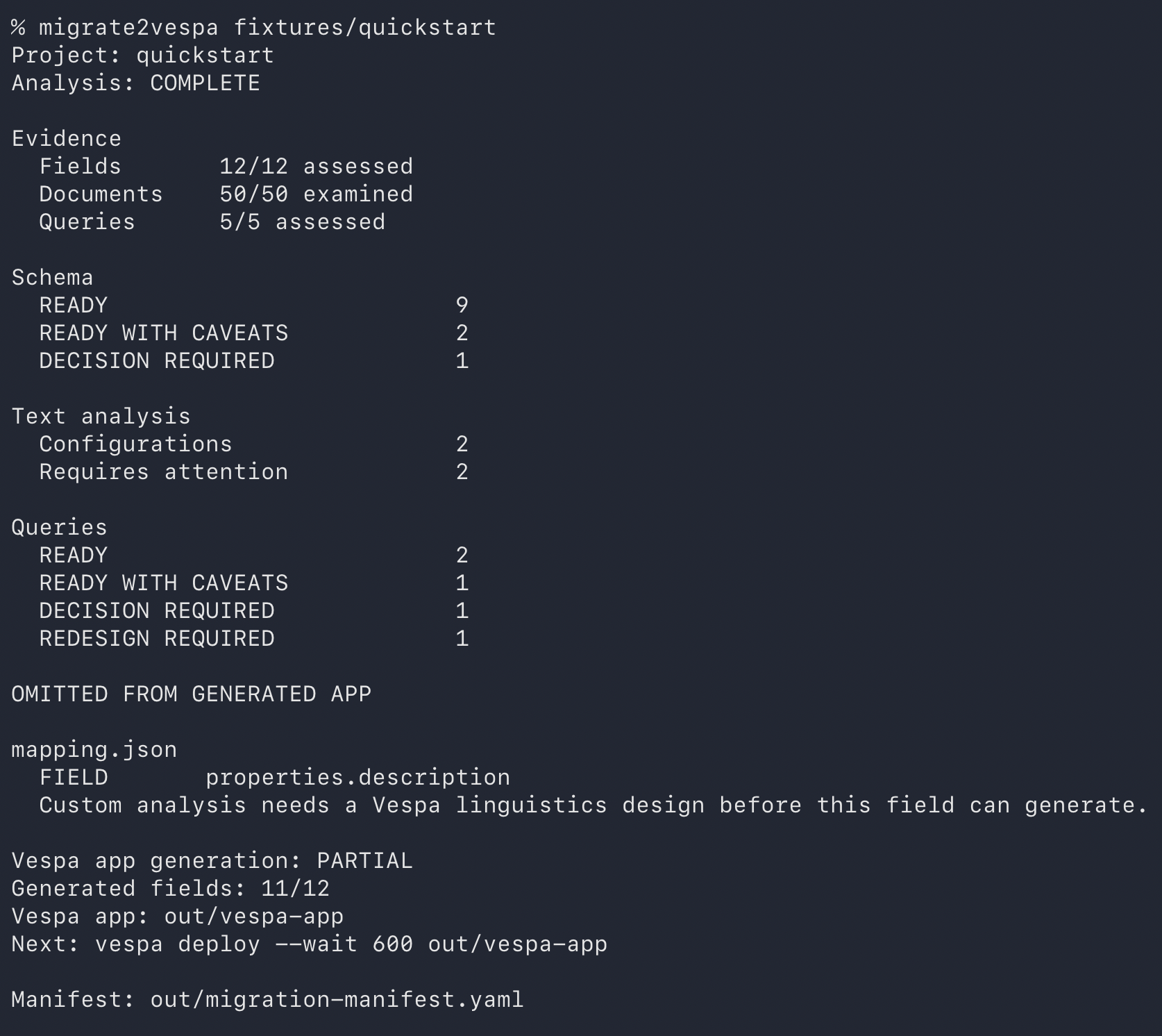
At the time of writing, the quickstart assesses all 12 fields, 50 documents, and five queries. It generates 11 fields:
OMITTED FROM GENERATED APP
  FIELD  properties.description
  Custom analysis needs a Vespa linguistics design before this field can generate.

Vespa app generation: PARTIAL
Generated fields: 11/12
Vespa app: out/vespa-app
PARTIAL means the app can be deployed and tested while description remains unresolved. The manifest records the omission and its reason; the other 11 fields are still generated.
The CLI summary shows what the tool assessed, which items still need a decision, and which fields went into the partial Vespa application:
Transparency and extensibility
The conversion rules are encoded in code, so the same inputs produce the same decisions. You can trace a proposal to its rule and evidence in the manifest, correct it when it does not fit your application, and extend the rules as new cases come up. The tool makes the first pass repeatable and shows where engineering judgment is still needed.
Version 0.1.1 covers a deliberately small set of constructs, and that support can grow: each conversion rule is explicit code that can be inspected, tested, and extended. When a construct is not supported yet or its semantics are unresolved, the tool records the issue or leaves that part out instead of guessing.
Open source and contributions
migrate2vespa is open source, and contributions are welcome. You can open an issue to request support for another Elasticsearch or OpenSearch construct, report an incorrect conversion with an example, or send a pull request with a fix, test fixture, or new rule. Contributions toward adding another source engine are welcome too; a clear example of the source construct and expected behavior is a great place to start.
A starting point, not a completed migration
The generated application is intended to get you to a first Vespa experiment using artifacts you already have.
It does not convert a full document export, translate Query DSL to YQL, or establish equivalent ranking and retrieval behavior.
The tool’s job is narrower: make the first field decisions inspectable, generate what can be generated safely, and leave a clear record of what still needs engineering work.
For straightforward conversions and supported adaptations, the tool takes care of repetitive first-pass work and gives you a starter application to test. When a field or query needs a different design—custom analysis, ranking, or query behavior—the manifest makes that work visible rather than pretending it is solved. Searchplex’s migration team can help design and validate the Vespa-native approach, then plan the move to production.
If this first experiment leaves you wondering whether a move to Vespa makes sense for your application, a Migration Audit can help assess the fit and outline the work involved.
If you find a mapping or query where the field plan is wrong, or where the tool should have stopped but didn’t, I’d be interested in testing it.